A VPN, short for virtual private network, is a service that routes your internet connection through a server somewhere else, encrypting your traffic along the way so your internet provider, the websites you visit, and anyone lurking on public wifi can’t easily see what you’re actually up to online.
This guide is part of our growing Tech & OS series — if you’re also trying to get faster on your Mac, we’ve got a full guide to keyboard shortcuts too.
NordVPN, ExpressVPN, ProtonVPN, Surfshark, they all work on roughly the same idea underneath, even if the apps look a bit different from one to the next. Learning how to use a VPN really comes down to three things once you strip it back: picking a provider you can actually trust, installing the app on whatever device you’re using, and knowing which server to connect to depending on what you’re trying to do. This guide covers all of that, plus streaming, gaming, using one abroad, the free-versus-paid question, and the legal and safety stuff people search for constantly but rarely get a straight answer on.
How to Use a VPN: Step-by-Step
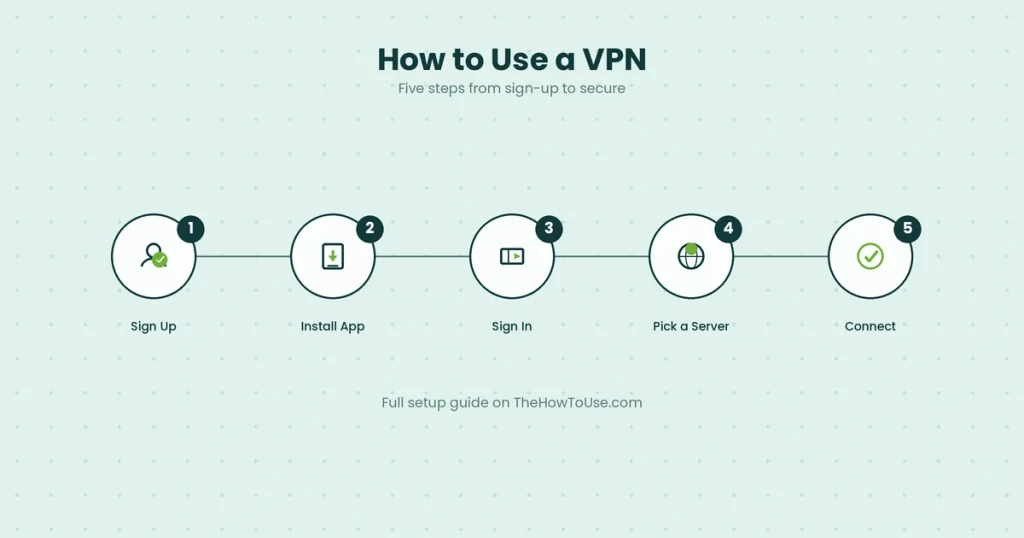
Every VPN, whatever provider’s name is on the app, runs through roughly the same setup once you actually sit down with it.
Step 1: Pick a provider and sign up
A paid service with a solid reputation, or one of the legitimate free tiers, more on that distinction further down, and create an account on their site.
Step 2: Download and install the app.
Grab it from the provider’s own website or the official app store, whatever device you’re setting it up on first.
Step 3: Sign in.
Open it up, log in with the account you just made, and you’ll land on a fairly simple main screen, nothing too intimidating.
Step 4: Pick a server.
Most apps show a list of countries or cities. Nearby usually means faster speeds. A specific country unlocks content or services tied to that region instead.
Step 5: Connect.
Tap connect, wait a few seconds, done, you’re routed through the VPN. Most apps show a clear on/off indicator so you always know it’s actually working.
The short version, for anyone skimming:
Sign up, install the app, log in, pick a server, hit connect.
What Is a VPN and How Does It Work?
Normally your internet traffic goes straight from your device to your internet provider, then out to whatever site or app you’re using, fully visible to that provider the entire way. A VPN wraps all of that in encryption first and routes it through a server the VPN company runs, so your provider just sees one encrypted connection to that server. Not what you’re actually doing on the other end of it.
The sites you visit see the VPN server’s location instead of yours, which is why a VPN can make it look like you’re browsing from a totally different country. None of this makes you invisible, though, your VPN provider itself can technically still see your traffic. Which is exactly why picking a trustworthy one matters more than most people realize going in.
How to Choose a Reliable VPN Provider
Dozens of providers out there, and a handful of specific things actually separate the trustworthy ones from the sketchy ones.
A no-logs policy means the provider isn’t keeping records of what you do while connected, ideally backed by an actual independent audit, not just a claim sitting on their homepage.
Server count and locations matter if you need specific countries regularly.
Speed varies a lot between providers, since encrypting traffic always costs you something, the real question is just how much.
And a kill switch, which cuts your internet entirely if the VPN connection drops, saves you from accidentally browsing unprotected without even realizing it disconnected.
How to Use a VPN on iPhone and Android
Mobile setup is honestly simpler than desktop most of the time, since phone VPN apps are built to be quick to configure out of the box.
Download your provider’s app from the App Store or Google Play, log in, and most apps will ask for a one-time permission to set up a VPN configuration on your phone. Standard stuff, nothing to worry about there. From that point, picking a server and connecting works identically to the desktop. A lot of providers also throw in a widget or quick-settings toggle, so you can connect without even opening the full app, genuinely handy for jumping onto coffee shop wifi without thinking twice.
How to Use a VPN on Windows and Smart TVs
Windows actually has a VPN option built right into the operating system, though most people still reach for their provider’s dedicated app instead. Usually faster to set up, more features too.
For the built-in route: Settings, then Network & Internet, then VPN, add a connection manually with the details your provider gives you. For the easier path, just install the provider’s Windows app and log in like you would anywhere else. Smart TVs are a bit more limited. Some providers support certain TV models directly through an app, but if yours isn’t one of them, setting the VPN up on your home router instead covers every device on that network, TV included, no installation on the TV itself required.

How to Use a VPN for Streaming (Netflix and Beyond)
Streaming’s one of the biggest reasons people get a VPN in the first place, usually to get at a show that’s sitting in another country’s catalog but not their own.
Connect to a server in the country whose catalog you want, open the streaming app like normal. Worth being upfront here, though: Netflix and most major streaming services actively detect and block known VPN server IPs, so results are genuinely all over the place. Some servers work fine.
Others get flagged within days of being discovered and stop working entirely. As for whether Netflix will actually ban your account over this, realistically, no. The usual outcome is just losing access to the catalog you were trying to reach, not a suspended account sitting in your inbox.
How to Use a VPN for Gaming
Gaming and VPNs have a messier relationship than most other uses. Honestly, a VPN can genuinely help in some situations and actively hurt in others.
It can cut down on ISP throttling if your provider’s specifically slowing down gaming traffic, and it can get you onto servers in other regions for games with region-locked content or earlier release windows. On the downside, routing through an extra server tends to add a bit of latency, and that matters a lot in anything fast-paced and competitive.
The general rule, if there is one: use it for access or throttling problems, skip it if your local connection’s already solid and low-latency on its own.
How to Use a VPN for Home Wifi
Running a VPN at the router level protects every device connected to your home network, without needing to install an app on each one separately.
Most providers publish router-level setup instructions, either for a router that supports VPN configuration natively or one flashed with compatible firmware. Set it up once at the router, and your smart TV, game console, laptop, everything on that wifi network routes through the VPN automatically from then on. A bit more technical to get going than a phone app, sure, but it’s a one-time job that covers the whole household afterward.
How to Use a VPN While Traveling Abroad
Traveling is genuinely one of the most useful times to already have a VPN set up. Ideally before you leave, not after you land somewhere and realize you needed it an hour ago.
A VPN lets you get at your home streaming catalog, banking apps, and other services that sometimes restrict access based on location, while you’re off in Australia, Europe, wherever, places your accounts might otherwise flag as suspicious activity from an unfamiliar country.
It’s also genuinely useful for locking down your connection on hotel and airport wifi, which is far less secure than most people assume it is. Set it up and test it before you travel, too. Some countries restrict or outright block VPN access, worth checking for your specific destination well ahead of time.
Free VPNs vs. Paid: Is There Really a Free Option?
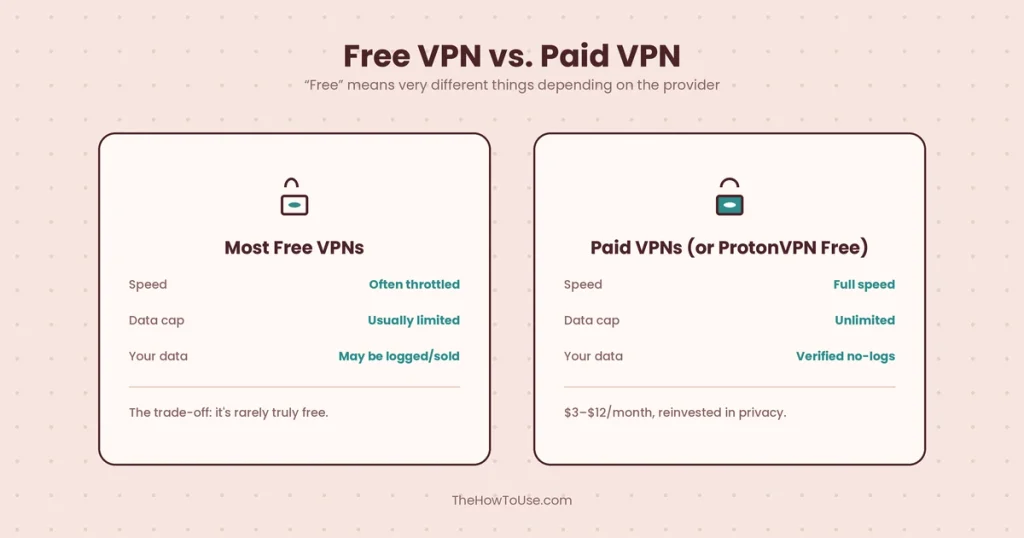
One of the most-searched questions about VPNs out there, and the honest answer is genuinely mixed. “Free” means very different things depending on who you ask.
ProtonVPN stands out here with a legitimately free tier, no data cap, decent speeds, though a smaller selection of server locations than its paid plan offers. Most other “free” VPNs, though, make their money by logging and selling your browsing data, throttling your speed until you upgrade, or burying you in ads, which kind of defeats the whole privacy point of bothering with a VPN at all.
Paid providers typically run somewhere between $3 and $12 a month depending on how long you commit to, and that money genuinely goes back into servers, speed, and actual privacy audits instead of into your data.
Is It Legal to Use a VPN?
In most countries, yes, completely, no asterisks needed. The US, the UK, most of Europe, the vast majority of the world really, place zero restrictions on personal VPN use.
A handful of countries do restrict or heavily regulate them, China and Russia being the usual examples that come up. Pakistan sits in a messier, still-evolving spot worth actually explaining rather than guessing at: VPNs aren’t banned outright there, but the Pakistan Telecommunication Authority has moved toward a registration system, requiring individuals, freelancers, and businesses to register their VPN use, and has started blocking unregistered ones in some cases.
Pakistan’s Council of Islamic Ideology separately called VPN use “un-Islamic” in a non-binding religious opinion, though PTA’s own chairman has said there’s no plan for a blanket ban. This is still actively shifting, honestly, so anyone in Pakistan relying on a VPN regularly should go check PTA’s current guidance directly rather than trust any single article, this one included, as the final word on where things stand today.
Is a VPN Actually Safe? (Can You Be Tracked?)
A reputable VPN genuinely does make you harder to track. “Harder” and “impossible” are different things, though, worth not mixing up.
Your internet provider, and anyone on that same public wifi network, can’t see your browsing activity anymore once it’s encrypted. Websites see the VPN server’s location, not yours. That said, your VPN provider itself can technically still see your traffic passing through its servers, which loops right back to why a genuinely verified no-logs policy matters as much as it does.
As for law enforcement, a VPN makes tracking meaningfully harder, sure, but it’s not a guarantee of total anonymity, especially if you’re staying logged into personal accounts the whole time you’re connected, since that alone can identify you regardless of what your IP address happens to show.
Common VPN Mistakes to Avoid
A handful of habits quietly undercut what a VPN’s actually supposed to do for you.
Using some sketchy free VPN with zero transparency about its logging practices is probably the biggest one, you’re often just trading your data to a different party instead of actually protecting it. Forgetting to turn on the kill switch means a dropped connection can expose your real traffic without any warning at all.
Staying logged into personal accounts while trying to stay anonymous kind of defeats the purpose too, since the account itself identifies you no matter what your VPN connection’s doing. And assuming a VPN alone makes you completely untraceable online is the kind of mistake that leads people to drop other basic security habits they’d still genuinely need otherwise.
Watch: How to Use a VPN (Video Guide)
Some of this just clicks faster watching someone click through the setup once, rather than reading another paragraph about it. Most major VPN providers put out their own official setup videos, and there’s no shortage of well-reviewed, independent walkthroughs on YouTube covering specific devices and use cases in more detail.
Frequently Asked Questions
How do I use a VPN step by step?
Sign up with a provider, download and install the app, log in, pick a server, hit connect. The full breakdown’s in the step-by-step section above.
How do I start a VPN?
Open the app once it’s installed, log in with your account, tap connect. Most apps default to a nearby, fast server automatically if you don’t bother picking one yourself.
How do you use a VPN in Pakistan?
The setup itself works the same as anywhere else, but the legal and regulatory side of things is genuinely more complicated there right now. Check the “Is It Legal to Use a VPN?” section above for the full, fact-checked breakdown instead of a quick guess here.
How do you use a VPN for free?
ProtonVPN offers a genuinely free tier, no data cap, though fewer server options than its paid plan. Most other free VPNs come with real trade-offs worth knowing first, covered in the free-versus-paid section above.
Is VPN 100% free?
Not in any sustainable, meaningful way for most providers out there. A few, ProtonVPN included, offer a real free tier, but most “free” VPNs make their money through data logging, ads, or throttling speeds instead of charging a subscription.
Is it legal to use a VPN?
Yes, in the vast majority of countries, including the US, UK, and most of Europe. A small number of countries restrict or regulate VPN use more heavily, detailed above.
Is there any danger in using a VPN?
The real risk comes from picking an untrustworthy provider, not from VPNs as a category. A sketchy free VPN can log and sell your data, which is arguably worse than just not using one in the first place.
Can police track VPN usage?
Genuinely harder with a VPN than without one, but not impossible, no. Law enforcement can potentially work with a VPN provider directly if that provider actually keeps logs, which is exactly why a verified no-logs policy matters as much as it does.
Will Netflix ban me if I use a VPN?
Realistically, no. The typical outcome is just losing access to whatever catalog you were trying to reach, not a suspended or banned account.
Key Takeaways
Using a VPN really comes down to a few habits sticking: pick a provider with a genuinely verified no-logs policy, flip on the kill switch so a dropped connection doesn’t quietly expose you, and keep in mind that a VPN makes you harder to track, not invisible. Once that’s sorted, streaming, gaming, locking down public wifi, traveling abroad, all of it becomes about as simple as picking a server and hitting connect. The legal and safety questions people worry about most usually come down to which provider you actually trust, not whether VPNs themselves are risky. And now you’ve got straight answers to the ones that actually matter.
Head back to the site page to browse more no-fluff guides across every category.