PayPal is a digital wallet and online payment service that lets you send money, receive money, and pay for things online without handing your card details to every website you shop on. The way it works: link a bank account, debit card, or credit card, and PayPal sits in the middle of the transaction so your actual bank or card number never reaches the seller at all. Learning how to use PayPal properly really just comes down to a few things. “This guide is part of our growing library of step-by-step how-tos — you can read more about how we put these together on our About Us page.”
Setting up and verifying your account. Knowing the difference between sending money to a friend versus paying an actual business. And understanding which actions cost you something and which ones don’t. This guide covers all of that, plus the app, using PayPal without a bank account, withdrawing money, Pay in 4, and a handful of scam patterns genuinely worth knowing about before you get started.
How to Use PayPal: Step-by-Step
Every new PayPal account goes through roughly the same setup, whether you’re planning to shop online, get paid for freelance work, or just split a dinner bill with a friend.
Step 1: Create an account.
Head to paypal.com or grab the app, and sign up with your email. You’ll pick between a Personal account for everyday use, or Business if you’re planning to accept payments as a seller.
Step 2: Verify your email and identity.
A confirmation link lands in your inbox, and you’ll need to fill in some basic identity details too. This one matters more than it looks, since an unverified account comes with lower sending and withdrawal limits.
Step 3: Link a bank account or card
Add a debit card, credit card, or bank account under your settings. For a bank, PayPal usually sends two small test deposits you’ll need to confirm back on the site.
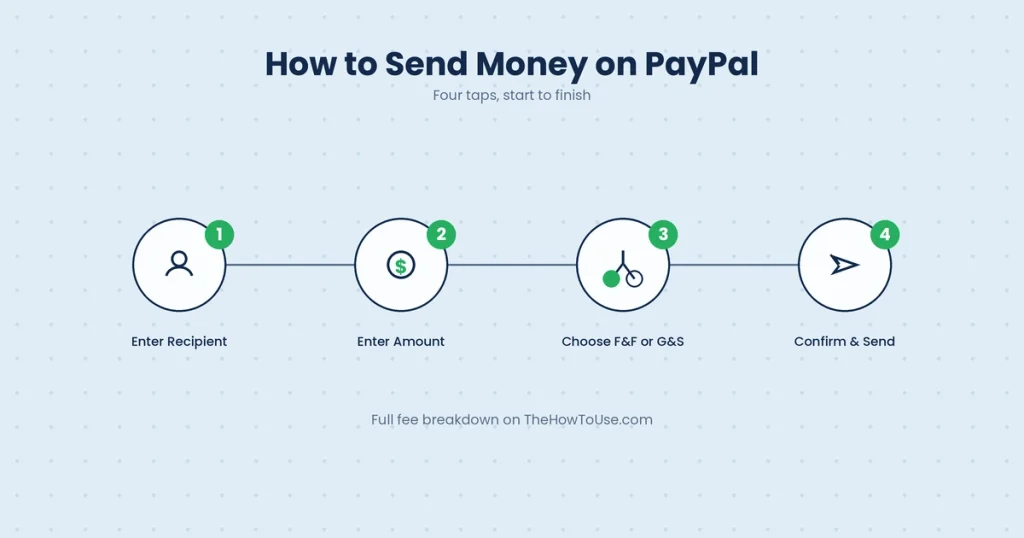
Step 4: Send or request money.
Once everything’s linked up, that’s really it. Send money, request it, or shop anywhere with a PayPal checkout button.
The short version, for anyone skimming:
Sign up, verify, link a bank or card, then send, receive, or pay with it.
Setting Up Your PayPal Account (Linking a Bank or Card)
Linking a payment method is really what makes PayPal useful in the first place. An account with nothing attached can’t do much beyond moving around whatever small balance it already has.
Go to Wallet, then Link a bank account or card. A card’s simple, just the number, expiration date, and billing address. A bank account can go two ways: instantly through your bank’s own login, which is the faster route, or manually with your account and routing numbers, where PayPal sends those two tiny deposits to prove it’s actually yours. Once confirmed, that bank becomes your default for withdrawals, and usually your backup funding source too, for whenever a payment runs higher than your PayPal balance can cover on its own.
How to Use PayPal to Send Money
Sending money’s probably the single most common reason anyone opens PayPal in the first place, and it comes in two flavors that are genuinely worth understanding before you send a single dollar.
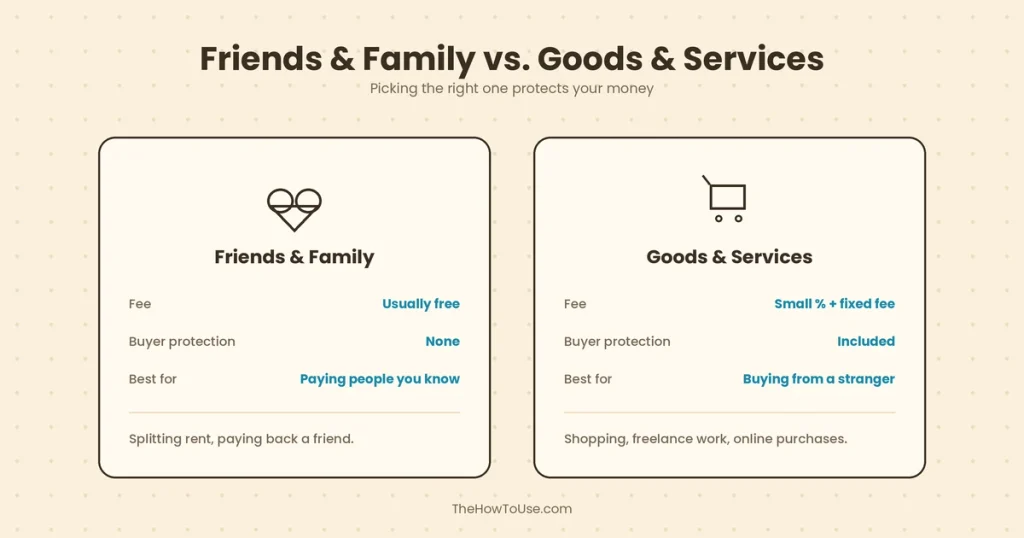
Click Send, punch in the recipient’s email, username, or phone number, then the amount. Here’s where people trip up: PayPal asks whether this is Friends and Family or Goods and Services. Friends and Family is for personal stuff, paying back a roommate, that kind of thing, and it’s typically free when funded by your bank or balance. Goods and Services is for actual purchases. It adds a small fee, sure, but it also comes with Purchase Protection if something goes sideways with what you bought. Picking the wrong one matters more than you’d guess. A scammer will often specifically ask for Friends and Family, precisely because it skips that buyer protection entirely.
How to Use PayPal to Receive Money
Receiving money works almost the same in reverse, and honestly, there’s not much to it beyond just having an account already set up.
Share your email, username, or a payment link with whoever’s sending. Once it lands, it shows up in your PayPal balance right on your dashboard. From there you can leave it sitting, transfer it to your linked bank, or in some countries, request a physical PayPal debit card and spend it directly. If the money’s coming in as payment for goods or services rather than a personal gift, PayPal might ask for some business details, especially once you’re getting paid with any regularity.
How to Use PayPal to Buy Things Online (and on Amazon)
Shopping with PayPal is genuinely one of its best features, mostly because it means never typing your card number into some random website again.
At checkout, look for the PayPal button next to the usual card fields. Click it, log in through the popup, confirm the payment, done. PayPal pulls from your balance first if there’s enough sitting there, then falls back to your linked bank or card. Amazon’s a bit of an odd case worth flagging: it doesn’t accept PayPal directly at checkout, so using a PayPal balance there usually means transferring funds to a linked card first, or using something like PayPal’s own prepaid card where that’s an option.
How to Use PayPal Without a Bank Account
You don’t actually need a linked bank account to use PayPal at all, which tends to surprise a lot of first-timers.
Fund payments with a debit or credit card instead, and receive money straight into your balance without ever connecting a bank. Where it gets limited is withdrawing that balance into actual spending money. Without a bank in the mix, you’re mostly looking at spending the balance directly through checkout wherever it’s accepted, using a PayPal prepaid debit card if your country offers one, or transferring to a linked card instead of a bank where that’s supported.
How to Withdraw Money From PayPal
Pulling money out of PayPal and into your real bank is usually straightforward. The timing just depends on which route you pick.
Go to your balance, hit Transfer Money, then Transfer to your bank. Standard transfers are free and take one to three business days. Instant transfers land within minutes but carry a small fee, roughly 1.75% of the amount, capped at a few dollars either way. Got a PayPal debit card? You can spend or pull cash straight from an ATM instead, skipping the bank transfer entirely.
How to Use the PayPal App
The official app, for both iPhone and Android, handles nearly everything the desktop site does, just shrunk down to fit a smaller screen.
Send and receive money, check your balance, scan a QR code to pay in person somewhere, get notified the second money moves in or out. It’s genuinely faster for quick, on-the-go stuff, splitting a dinner bill and so on, while the desktop site tends to win for anything more involved, digging through old transactions or tweaking a business account’s finer settings.
PayPal Pay in 4 and PayPal Credit Explained
Two different ways to spread out a payment here, and they get mixed up constantly even though they work pretty differently.
Pay in 4 splits a purchase into four equal, interest-free payments every two weeks, the same basic idea as other “buy now, pay later” services you’ve probably seen by now. It’s built right into checkout for eligible purchases, usually $30 to $1,500. PayPal Credit is something else entirely, a revolving line of credit, more like a credit card really, that you apply for once and reuse over time, with interest kicking in if the balance isn’t cleared inside the promotional window. Pay in 4 fits a single bigger purchase well. PayPal Credit’s more for ongoing, repeat use.
Using PayPal in Physical Stores
PayPal isn’t just an online thing anymore, for what it’s worth. Plenty of in-person retailers take it too these days, usually through the app.
Open the app at checkout, look for the QR code or barcode option. The cashier scans it, or you scan theirs, and the payment pulls from your balance, bank, or card like any online purchase would. Not every store’s on board yet, but it’s spread quite a bit across larger chains over the past few years.
PayPal Fees: What Actually Costs Money
PayPal’s free for a lot of everyday use, but a handful of specific actions do cost something, and it’s worth knowing which ones ahead of time so nothing catches you off guard later.
Sending money to friends and family, funded by bank or balance, is typically free. Fund that same payment with a credit card instead, and a small percentage fee usually sneaks in. Receiving money for goods and services almost always includes a seller fee, a few percent plus a small flat amount, taken out automatically before the funds even hit your balance. Currency conversion adds its own markup too, on top of the standard exchange rate, if you’re sending or receiving in a different currency. And instant transfers to your bank cost a bit, as mentioned, while standard transfers genuinely don’t.
How to Avoid Common PayPal Scams
A fair number of PayPal-related searches aren’t really about using the platform at all. They’re things like “how to get free $20 on PayPal” or “how to turn $20 into $100 fast.” Worth saying plainly: PayPal doesn’t hand out free money, and anyone promising that is almost certainly running some kind of scam.
A few patterns come up again and again.
Fake “free money” offers on social media ask you to click a link, “verify” your account, or send a small amount first to “unlock” a bigger payout. None of that is real.
Overpayment scams involve someone sending more than agreed and asking for the difference back, only for the original payment to get reversed as fraudulent later, leaving you out whatever you refunded.
Fake invoices dressed up as official PayPal emails try to get you clicking through to a lookalike login page. And that Friends and Family request from earlier is itself a warning sign the moment a stranger selling something insists on it. They’re really just asking you to give up your buyer protection.
The rule that covers most of this, honestly: if someone’s promising free money, pushing an unusual payment method, or asking you to click a link in some email you weren’t expecting, slow down. Type paypal.com into your browser yourself instead of clicking through anything.
Common PayPal Mistakes Beginners Make
A handful of habits trip up new users again and again.
Sending a payment as Friends and Family for an actual purchase is the big one. It waives your buyer protection the second you hit send. Not double-checking the recipient’s email first is another classic, and money sent to the wrong address is genuinely hard to get back. Ignoring the currency shown at checkout is a quieter mistake, especially on international sites, since PayPal’s conversion rate isn’t always the best one out there. And leaving your account unverified too long just limits what you can do with it, so it’s worth getting that step done early rather than putting it off.
Watch: How to Use PayPal (Video Guide)
Plenty of people genuinely find it easier to watch someone click through a setup than read about it. PayPal’s own help center has short walkthrough videos for account setup and sending money, and there are several well-reviewed, regularly updated beginner tutorials on YouTube covering the same ground with a bit more personality.
Frequently Asked Questions
How do I use PayPal for the first time?
Create an account, verify your email, link a bank or card, and you’re set to send, receive, or pay. The full walkthrough’s up in the step-by-step section.
Is PayPal available in Pakistan?
Not for personal or business accounts, as of 2026. Residents can’t open a standard PayPal account or receive payments for goods and services through it directly. Xoom, PayPal’s own remittance service, can send money into a Pakistani bank account from abroad, but that’s one-way only and doesn’t help with receiving client or freelance payments. Payoneer and Wise tend to be the go-to alternatives for Pakistani freelancers and businesses needing to receive money internationally.
How do I withdraw money from PayPal?
Balance, Transfer Money, Transfer to your bank. Standard’s free and takes one to three business days. Instant costs a small fee but lands within minutes.
What’s the difference between PayPal Goods and Services and Friends and Family?
Friends and Family is personal payments, no buyer protection, usually no fee. Goods and Services is for purchases, includes a small fee, and comes with purchase protection if something goes wrong.
Is PayPal actually safe to use?
Yes, for the vast majority of legitimate transactions. Encryption, fraud monitoring, and your bank or card details never actually reach the seller. The real risk almost always comes from scams tricking you into sending money the wrong way, not from any flaw in PayPal itself.
Can I use PayPal without linking a bank account?
Yes. Fund payments with a debit or credit card instead, though withdrawing that balance into real spending money gets a bit more limited without a bank in the mix.
Key Takeaways
Using PayPal really comes down to a few habits: verify your account early, know the difference between Friends and Family and Goods and Services before you ever hit send, and stay alert to the scam patterns that specifically target PayPal users. Once your account’s set up and linked properly, sending money, getting paid, and shopping online all become about as simple as this stuff gets, and the fees are predictable enough once you know what actually triggers them. Head back to the homepage to browse more no-fluff guides across every category.
The biggest risk with PayPal was never really the platform itself. It’s the scams built around it. Now you know what those look like too.