
How to use Zelle in a nutshell: open your bank’s mobile app, find “Send Money with Zelle,” and enroll with a U.S. mobile number or email address. Pick the checking account the money should land in, then choose a recipient, type an amount and tap send. If the other person is already enrolled, the money usually arrives in minutes. One catch worth knowing first: Zelle’s standalone app stopped sending money in April 2025, so it only works through banks and credit unions that offer it.
Splitting rent. Paying the babysitter. Covering a friend’s half of dinner. Zelle was made for exactly those small, quick, person-to-person payments, and it’s already built into most US banking apps, so there’s nothing extra to install. This guide covers what Zelle is, how to enroll, how to send, receive and request money, and how limits and fees really work. A safety section and a quick fix list come last, since Zelle has some sharp edges.
Quick Takeaways
- Zelle works only through banks and credit unions that offer it. The standalone app can’t send money anymore.
- Both people need a U.S. checking or savings account.
- Zelle charges no fee, but banks set the limits.
- A payment can’t be canceled once the recipient is enrolled.
- Send money only to people you know. There’s no purchase protection.
What Is Zelle and How Does It Work?
Zelle is a payment network that moves money directly between U.S. bank accounts. Not through a middleman wallet. Straight from one checking account to another.
It runs inside bank apps. When someone sends money, Zelle looks up the recipient’s email address or mobile number in its directory and tells their bank a payment is coming. If the recipient is already enrolled, the money goes into their account within minutes. If they’re not, they get a text or email with a link to sign up first.
Nothing sits in a Zelle balance. That’s a big difference from Venmo or Cash App, and it explains both Zelle’s speed and its biggest weakness. Money moves fast, and it’s hard to pull back.
What You Need Before You Start
| What’s needed | Why it matters |
| A U.S. checking or savings account | Zelle moves money between U.S. bank accounts only |
| A bank or credit union that offers Zelle | The standalone app no longer works for payments |
| A U.S. mobile number or email address | This becomes the “Zelle ID” people use to pay you |
| The bank’s mobile app or online banking | Where the Zelle option lives |
Banks like Chase, Bank of America, Wells Fargo, Capital One, PNC, U.S. Bank, Truist and Huntington offer Zelle in their apps. The full list of participating banks and credit unions is on Zelle’s own site. When it comes to what banks use Zelle, that list is the one to trust, because smaller banks and credit unions join all the time.
Can You Use Zelle Without a Bank Account (or If Your Bank Doesn’t Offer It)?
Not anymore. As of April 1, 2025, people can no longer send or receive money through the standalone Zelle app, which used to be the workaround.
So the options now are simple. Without a U.S. checking or savings account, Zelle isn’t available. If the bank doesn’t offer it, there are two paths. Open an account at a bank or credit union that does, or skip Zelle and use another app, like Venmo, Cash App or PayPal, which connect to almost any bank account.
One more wrinkle. Some banks make new account holders wait before they can receive Zelle payments. A quick look at the bank’s Zelle page before opening an account just for this saves frustration.
How To Enroll in Zelle for the First Time
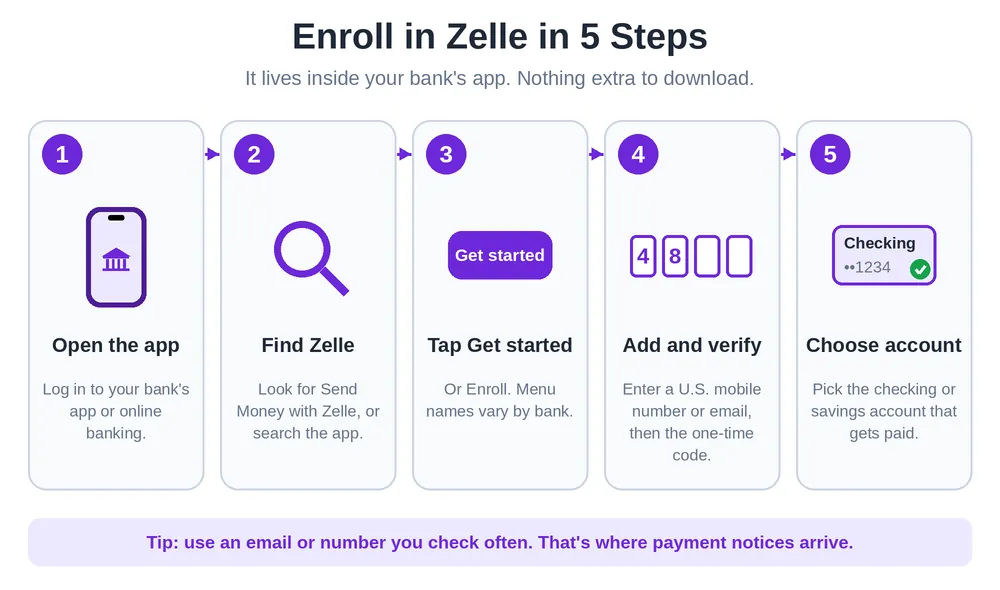
Enrolling takes a few minutes. The steps are nearly the same everywhere, and only the menu names change.
- Log in to the bank’s mobile app or online banking.
- Find the Zelle option. It’s usually under “Pay & Transfer,” “Move Money,” or “Send Money with Zelle.”
- Tap Get started (or Enroll).
- Choose a U.S. mobile number or email address. Pick one that’s checked regularly, since that’s where payment notices arrive.
- Confirm it with the one-time code the bank sends.
- Select the checking or savings account that should receive money.
- Agree to the terms, and finish.
U.S. Bank’s help page describes the same flow: choose a mobile number or email, pick the account to link, and confirm. The chosen account becomes the default for sending, and it’s also where received money lands.
Where To Find Zelle in Popular Bank Apps
| Bank | Where to look |
| Chase | Chase Mobile app > Pay & transfer > Send money with Zelle > Get started |
| PNC | PNC Mobile app > Pay & Transfer > Send Money with Zelle |
| U.S. Bank | Transfer & pay > Send & request money with Zelle > Get started |
Wells Fargo, Bank of America, Capital One and Huntington all have Zelle inside their apps too. Menu names shift with app updates, so searching the app for “Zelle” is usually faster than hunting through menus.
How To Use Zelle To Send Money
Once enrolled, sending is the easy part.
- Open the bank app and tap Send Money with Zelle.
- Choose Send.
- Pick a recipient from the phone’s contacts, or type in their U.S. mobile number or email address.
- Enter the amount, and add a short note if needed.
- Review everything. Then tap Send.
If the recipient is enrolled, the money goes straight to their account in minutes. If they’re not, they get a notification with instructions to enroll.
Check the Name Before Sending
Zelle usually shows the recipient’s first name once a number or email is entered. Confirm it. A typo in a phone number, or a number that changed hands, can send money to a stranger. If the recipient is already enrolled, the payment can’t be canceled, and getting it back depends on that stranger being kind.
Texting the person first takes ten seconds.

How To Use Zelle To Receive Money
Receiving takes even less. Someone only needs to be enrolled and to share the email address or U.S. mobile number they used. Some banks also let users share a Zelle QR code.
If an unenrolled person gets paid, they’ll receive a text or email. One detail trips people up: they should enroll with the same email or mobile number that got the notification. Using a different one means the payment won’t find them.
Once enrolled, the money drops into the linked checking or savings account, usually within minutes. There’s no separate balance to cash out. And some banks, like U.S. Bank, deactivate a Zelle profile after a long stretch of inactivity (the bank mentions 18 months), which means re-enrolling later.
How To Request Money With Zelle
Chasing a friend for their share? Use the Request option. Pick the person, enter the amount, add a note, and send. If the other person isn’t enrolled with Zelle yet, banks like HSBC say the request must go to their email address, not a mobile number.
Zelle Limits and Fees
Fees
Zelle itself doesn’t charge for sending or receiving money. Banks and credit unions rarely add a fee either, but it’s worth a quick look at the bank’s fee page. The more common catch isn’t a fee at all. It’s a limit.
Limits
Banks set their own sending limits, and they differ a lot. Receiving is generally less restricted. Here’s a snapshot of what major banks have published, and Bankrate’s roundup of bank limits is handy for comparing more:
| Bank | Send limit (personal accounts) |
| Chase | Tiered by transaction, from $500 up to $10,000 a day, set by Chase |
| Wells Fargo | $3,500 per rolling 24 hours, $20,000 per rolling 30 days |
| Bank of America | Reported at $3,500 a day and $20,000 a month |
| Others | Anywhere from about $1,000 to $2,000 a day for some banks and credit unions |
These numbers change, and many banks only show the exact limit inside the app. Opening the Zelle screen and checking is the surest way to know. And if a payment bumps into a limit, some banks will raise it for accounts with a good history.
How To Use Zelle Online
Zelle isn’t limited to a phone. Most banks that offer it also support it in desktop online banking, so a laptop works fine. Log in, find Zelle in the transfer or payment menu, and follow the same steps.
Is Zelle Safe? Scams and How To Protect Yourself
Zelle itself is secure. It’s built by banks and runs through them. The problem is how it’s used.
The FTC’s advice on mobile payment apps starts with the same rule: never send money to anyone you don’t recognize.
The big one: payments someone authorizes are hard to get back. Purchase problems, like paying a seller who never delivers, generally aren’t covered. Banks do reimburse confirmed unauthorized fraud, and AARP’s guide to P2P scams notes that Zelle also requires reimbursement for certain qualifying impostor scams. Plenty of victims don’t qualify, though. That’s very different from a credit card.
Common Scams
- Fake bank alerts. Someone pretends to be the bank’s fraud team and says to “send money to yourself” to protect it.
- Fake sellers. Concert tickets, apartment deposits, puppies. A seller insists on Zelle only.
- Wrong-person payments. A typo sends money to someone who never responds.
How To Stay Safe
- Send money only to people you know and trust.
- Treat Zelle like cash. Fast, and hard to undo.
- Never pay a stranger or a deposit for something unseen. Use a credit card for those.
- Banks don’t ask customers to send money “as a test.”
- Double-check the number or email, and the name shown.
- Report scams to the bank right away.

Zelle vs Venmo, Cash App and PayPal
| Option | How it works | Good to know |
| Zelle | Bank to bank, inside bank apps | No balance, can’t cancel, U.S. accounts only |
| Venmo | App with its own balance | Social feed, works with most banks |
| Cash App | App with a balance and card | Works with most banks |
| PayPal | Wallet plus linked accounts | Offers buyer protection on some purchases |
They don’t talk to each other directly. Money can’t go straight from Zelle to PayPal, and Venmo and Cash App users can’t accept Zelle payments. The workaround is the shared bank account. Send money with Zelle to a bank account, then move it from that bank to Venmo, Cash App or PayPal. It adds a step, and sometimes a day.
Our guide on how to use PayPal covers the online-payments side. And if paying with a phone at the register is the goal, how to use Apple Pay explains that. Zelle works best for quick, trusted payments between people who already share a bank connection.
Zelle Not Working? Quick Fixes
When Zelle acts up, it’s usually one of these.
- Check the bank. Make sure the bank offers Zelle, and that Zelle is turned on.
- Confirm enrollment. The number or email has to be verified.
- Check the limit. A payment above the daily or monthly cap will be declined.
- Re-check the recipient. A wrong number is the most common mistake.
- Update the app. An outdated banking app can hide the Zelle option.
- Restart the app or phone. Boring, but it works surprisingly often.
- Call the bank. Banks sometimes hold payments for review.
Frequently Asked Questions
How do I use Zelle for the first time?
Open the bank’s app and find the Zelle option. Enroll with a U.S. mobile number or email address, confirm it with the one-time code, and pick the checking account that should receive money. After that, choose a recipient, type an amount and tap send.
How do I pay someone with Zelle?
Tap Send Money with Zelle, then pick a contact or enter their U.S. mobile number or email. Add the amount and an optional note, check the name shown, and send. If they’re enrolled, the money lands in minutes.
What is the downside of using Zelle?
Little protection for payments someone authorizes, especially purchases that go wrong. Payments can’t be canceled once the recipient is enrolled. Banks set limits, it’s U.S.-only, and it needs a participating bank. It also doesn’t connect directly to Venmo, Cash App or PayPal.
How much does Zelle charge to send $1000?
Zelle charges nothing. Banks rarely add a fee, but it’s worth checking the bank’s fee page. The more likely snag is a daily limit, since some accounts start lower than $1,000 until they build a history.
Can you transfer $20,000 through Zelle?
Usually not in one go. Limits vary by bank. Several big banks cap personal accounts around $20,000 a month, with daily limits lower than that. Chase tiers go up to $10,000 a day, and Wells Fargo sets $3,500 per 24 hours. Spreading it over days is possible, but for large amounts, an ACH transfer or wire is often better. And be extra careful, because big Zelle payments are what scammers aim for.
Do I need a bank account for Zelle?
Yes. A U.S. checking or savings account at a participating bank or credit union is required. The standalone app, which used to be the workaround, no longer sends money.
Can I Zelle a Cash App?
Not directly. The two don’t connect. The workaround is a shared bank account. Receive the Zelle payment in the bank, then add money from that bank to the Cash App.
Can I use PayPal with Zelle?
Not directly, either. You can’t send Zelle money into PayPal, but you can link the same bank account to both. Move the money to the bank, then add it to PayPal from there.
Is Zelle free to use?
Zelle doesn’t charge fees to send or receive. A bank or credit union could, so a quick look at its fee page is smart. The bigger limit on Zelle isn’t cost. It’s the lack of fraud protection on authorized payments.
Final Thoughts
Learning how to use Zelle really comes down to three things. Enroll through the bank’s app. Check the recipient’s name before sending. And treat every payment like handing over cash.
Banks, limits and features change often, so Zelle’s own site and the bank’s help pages are the best place to confirm the latest details for a specific account.
For more free step-by-step finance guides like this one, visit The How To Use.
Sources consulted: Zelle partner bank help pages (U.S. Bank, PNC, Chase and HSBC), NerdWallet, Bankrate, the FTC, AARP and Credit Karma. All content was written independently in original wording.